This article was written by John Daggett. John is a Mozilla contributor and has been working hard with font creators and web developers to improve the state of fonts on the web. This article is a high-level overview of whats different and shows some examples of WOFF in use. A full list of other supporting organizations can be found at the official Mozilla Blog.

In Firefox 3.5 we included support for linking to TrueType and OpenType fonts. In Firefox 3.6 we’re including support for a new font format – the Web Open Font Format, or WOFF. This format has two main advantages over raw TrueType or OpenType fonts.

  1. It is compressed, which means that you will typically see much smaller download sizes compared with raw TrueType or OpenType fonts.
  2. It contains information that allows you to see where the font came from – without DRM or labeling for a specific domain – which means it has support from a large number of font creators and font foundries.

The WOFF format originated from a collabaration between the font designers Erik van Blokland and Tal Leming with help from Mozilla’s Jonathan Kew. Each had proposed their own format and WOFF represents a melding of these different proposals. The format itself is intended to be a simple repackaging of OpenType or TrueType font data, it doesn’t introduce any new behavior, alter the @font-face linking mechanism or affect the way fonts are rendered. Many font vendors have expressed support for this new format so the hope is this will open up a wider range of font options for web designers.

Details on Differences between TrueType, OpenType and WOFF

First, compression is part of the WOFF format so web authors can optimize the size of fonts used on their pages. The compression format is lossless, the uncompressed font data will match that of the original OpenType or TrueType font, so the way the font renders will be the same as the original. Similar compression can be achieved using general HTTP compression but because compression is part of the WOFF format, it’s simpler for authors to use, especially in situations where access to server configuration is not possible.

Second, the format includes optional metadata so that a font vendor can tag their fonts with information related to font usage. This metadata doesn’t affect how fonts are loaded but tools can use this information to identify the source of a given font, so that those interested in the design of a given page can track down the fonts used on that page. Fonts in WOFF format are compressed but are not encrypted, the format should not be viewed as a “secure” format by those looking for a mechanism to strictly regulate and control font use.

Note: until Firefox 3.6 ships, users can test the use of WOFF fonts with Firefox nightly builds.

Examples

Below is a simple example that shows how to construct an @font-face rule that links to a WOFF font. To support browsers that only support direct linking to OpenType and TrueType fonts, the ‘src’ descriptor lists the WOFF font first along with a format hint (“woff”), followed by the TrueType version:

/* Gentium (SIL International) */
 
@font-face {
  font-family: GentiumTest;
  src: url(fonts/GenR102.woff) format("woff"),
       url(fonts/GenR102.ttf) format("truetype");
}
 
body {
  font-family: GentiumTest, Times, Times New Roman, serif;
}

Structured this way, browsers that support the WOFF format will download the WOFF file. Other browsers that support @font-face but don’t yet support the WOFF format will use the TrueType version. (Note: IE support is a bit trickier, as discussed below). As WOFF is adopted more widely the need to include links to multiple font formats will diminish.
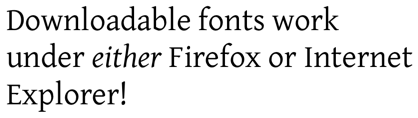
Other examples below demostrate the use of WOFF formatted fonts but each example has been constructed so that it will work in any browser that supports @font-face, including Internet Explorer.

A font family with multiple faces
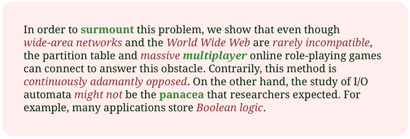
Using a Postscript CFF font
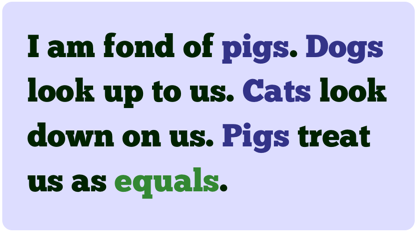
African Language Display

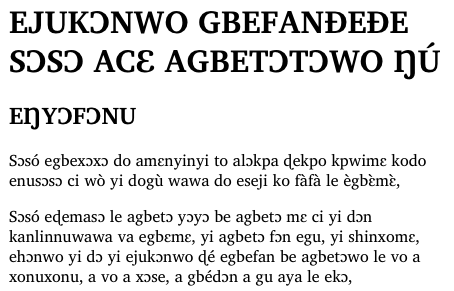
Below is an example of how downloadable fonts can be used to render languages for which font support is usually lacking. The example shows the UN Declaration of Human Rights, translated into two African languages, and how these render with default browser fonts vs. with a downloadable font suited for rendering these languages.

Note that in one of these examples that the font size goes from a 3.1MB TTF to a 1MB WOFF font and in the other from a 172KB TTF to an 80KB WOFF file.
Another Postscript CFF font

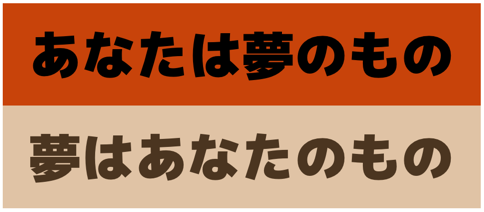
An example in Japanese
Working With Other Browsers

Firefox 3.6 will be the first shipping browser to support the WOFF format so it’s important to construct @font-face rules that work with browsers lacking WOFF support. One thing that helps greatly with this is the use of format hints to indicate the format of font data before it’s downloaded; browsers that don’t recognize a given format simply skip data in a format they don’t support.

Internet Explorer, including IE8, only supports the EOT font format and only implements a subset of the @font-face rule descriptors. This makes creating cross-platform @font-face rules that work with IE especially tricky. One solution is to make different rules for IE:

@font-face {
  font-family: GentiumTest;
  src: url(fonts/GenR102.eot);  /* for IE */
}
 
@font-face {
  font-family: GentiumTest;
  /* Works only in WOFF-enabled browsers */
  src: url(fonts/GenR102.woff) format("woff"); 
}

One minor downside of this is that IE doesn’t understand format hints and doesn’t parse @font-face URL’s correctly, it treats format hints as part of the URL, so web authors using the @font-face rules above will see the following in their access logs:

GET /fonts/GenR102.eot HTTP/1.1" 200 303536
GET /fonts/GenR102.woff)%20format(%22woff%22) HTTP/1.1" 404 335

IE successfully pulls down and uses the EOT version of the font but also tries to pull down the WOFF font with the format hint included in the URL. This fails and doesn’t affecting page rendering but it wastes valuable server resources. For more discussion, see Paul Irish’s blog post for one interesting workaround.

Another problem is that IE currently tries to download all fonts on the page, whether they are used or not. That makes site-wide stylesheets containing all fonts used on site pages difficult, since IE will always try to download all fonts defined in @font-face rules, wasting lots of server bandwidth.

Further Resources

Documentation

Latest draft WOFF specification
Original blog post on using @font-face
CSS3 Fonts working draft
MDC @font-face documentation

Tools

Jonathan Kew’s sample encoding/decoding code
woffTools – tools for examining and validating WOFF files
FontTools/TTX – Python library and tool for manipulating font data
Web-based font subsetting tool

General @font-face Examples

CSS @ Ten: The Next Big Thing
Example layout using Graublau Sans
Examples of Interesting Web Typography
The Elements of Typographic Style Applied to the Web

Font Resources

Font Squirrel
10 Great Free Fonts for @font-face
40 Excellent Free Fonts by Smashing Magazine

234 comments

Post a comment
  1. Pingback from Firefox 3.6 Release Optimized Build on January 25th, 2010 at 1:52 am:

    [...] Support for the WOFF font format. [...]

    Reply

  2. Pingback from Firefox 3.6 - Le novità | nicolacornolo.it on January 25th, 2010 at 4:03 am:

    [...] Supporto esteso per i caratteri scaricabili utilizzando il nuovo formato di carattere WOFF. [...]

    Reply

  3. Pingback from Релиз Firefox 3.6 / Новости / Блог divbyzero on January 25th, 2010 at 5:40 am:

    [...] поддержка Web Open Font Format (WOFF), который предполагает наличие  шрифтов OpenType, Open Font [...]

    Reply

  4. Christophe wrote on January 25th, 2010 at 8:01 am:

    Won’t we see spammers use this feature to create spam messages that are undetectable automatically (unless using OCR or using stats on use of characters..): If I create a web font that inverts characters (‘e’ being actually shown as ‘p’ by the font): the content will look like binary data/gibberish but when displayed it will actually read as a spam message trying to sell you some medication. I can see at least http proxy filters being fooled by this system for instance, maybe even emails if your client supports this.
    Any thoughts on ways to prevent this from happening (if it hasn’t already)?

    Reply

    1. Brian Riley wrote on January 28th, 2010 at 10:34 am:

      These fonts are only usable on the domain where they are stored. AFAIK they cannot be used in an e-mail unless it directs you back to their site.

      You can’t download a font from a different domain at this point for your webpages, you have to host the font.

      The people that create the fonts are not particularly dumb, if it wasn’t this way they would sell exactly one copy. ;)

      Reply

  5. Pingback from Firefox 3.6 | - DIDUR.org.ua - on January 25th, 2010 at 8:43 am:

    [...] Продолжено расширение возможности загрузки шрифтов из сети, для чего была добавлена поддержка нового формата шрифтов WOFF. [...]

    Reply

  6. Pingback from Mozilla forges ahead with Firefox 3.6 | The Download Blog – Download.com - Turn On The World on January 25th, 2010 at 9:57 am:

    [...] from encroaching on Firefox’s file system turf to increase stability; support for the Web Open Font Format, which means users viewing pages in other languages should see faster load times via downloadable [...]

    Reply

  7. Pingback from 51 Wallpapers inspirés par le navigateur web Firefox. | Minuscurl - Le blog graphique et high-tech fait maison on January 25th, 2010 at 1:27 pm:

    [...] Support permanent pour les polices Web téléchargeables via le nouveau format de police WOFF. [...]

    Reply

  8. Pingback from Firefox 3.6 | IT Talkers on January 25th, 2010 at 1:40 pm:

    [...] Continued support for downloadable web fonts using the new WOFF font format. [...]

    Reply

  9. Pingback from Firefox 3.6 ora disponibile al download!!!! | Hi-News on January 25th, 2010 at 1:53 pm:

    [...] e il 20% più veloce di Firefox 3.5. Introdotto il supporto ai poster frame e formato di carattere WOFF (Web Open Font Format). Tante sono le novità, troviamo: Awesome Bar, One-Click Bookmarking, [...]

    Reply

  10. Pingback from Firefox 3.6 Disponible para descarga – Vaya astracanada !!! on January 26th, 2010 at 12:34 am:

    [...] Soporte para el formato de fuente WOFF. [...]

    Reply

  11. Pingback from Download Firefox 3.6 final version | Tech Mania on January 26th, 2010 at 6:35 am:

    [...] Support for the WOFF(Web open font format) font format. [...]

    Reply

  12. Pingback from Browser Baru Firefox 3.6 « Dunia Komputer on January 26th, 2010 at 6:44 am:

    [...] Lupakan fontasi standar! Untuk para pengembang web, Anda dapat menyertakan fontasi yang Anda inginkan untuk ditampilkan pada pemirsa situs Anda. Silakan baca penjelasan tentang fitur ini untuk keterangan lebih lanjut. [...]

    Reply

  13. Pingback from Firefox 3.6 is here! « Realtors on the Internet on January 26th, 2010 at 7:08 am:

    [...] Continued support for downloadable web fonts using the new WOFF font format. [...]

    Reply

  14. Pingback from FireFox 3.6 Rkeased - Apex Community Forums on January 26th, 2010 at 8:06 am:

    [...] Continued support for downloadable web fonts using the new WOFF font format. [...]

    Reply

  15. Pingback from Firefox 3.6:what’s New on January 26th, 2010 at 9:18 am:

    [...] Continued support for downloadable web fonts using the new WOFF font format. [...]

    Reply

  16. Pingback from Firefox 3.6 – Fashionably Late « Blog of the FuzzyFox « FuzzyFox on January 26th, 2010 at 12:20 pm:

    [...] Designers there is now support for CSS gradients as well as WOFF (these are small fonts that you can integrate into a website). This means that not only will you be [...]

    Reply

  17. Pingback from Mozilla publica Firefox 3.6 | TechNoticias :: LatinAmerica on January 26th, 2010 at 3:06 pm:

    [...] Tratamiento de tipografías: además de las familias estándares OpenType y TrueType incorporadas en Firefox 3.5, ahora el navegador también implementa el nuevo “Web Open Font Format”, admitido por un gran número de proveedores comerciales de tipografías (WOFF). [...]

    Reply

  18. Pingback from ATypI 2010 « Typeforge on January 27th, 2010 at 3:27 am:

    [...] on attending the workshops. After all, WOFF is here and is looking good (have you seen the new Firefox rendering capabilities?). And Dublin is just a quick airplane ride [...]

    Reply

  19. Pingback from Firefox 3.6 unterstützt WOFF - Netzlogbuch on January 27th, 2010 at 4:28 am:

    [...] Beiträge zu WOFF: So kannst Du den ersten .woff-Font testen auf Fontblog und Web Open Font Format for Firefox 3.6 auf [...]

    Reply

  20. Pingback from Firefox 3.6 Released! » 笨師拉 – BenZilla on January 27th, 2010 at 7:05 am:

    [...] Continued support for downloadable web fonts using the new WOFF font format. [...]

    Reply

  21. Pingback from Safe to Use @font-face Yet? on January 27th, 2010 at 11:25 pm:

    [...] forward to today and now every major browser supports @font-face in some sort of fashion. Firefox just announced support for the newest supported font type: .woff. So the web font is still evolving, but the big [...]

    Reply

  22. Pingback from Firefox 3.6 Final duyệt web nhanh hơn 20% | Vân Canh - Bình Định - Việt Nam on January 28th, 2010 at 9:10 am:

    [...] khi hỗ trợ thêm font định dạng web mở (Web Open Font Format). Xem thông tin chi tiết tại đây. Bên cạnh đó, Firefox 3.6 cũng hỗ trợ các công nghệ web mới nhất của CSS, DOM [...]

    Reply

  23. Pingback from Check It Out – Firefox 3.6 | Best Tutorials, Tips, Tricks For You on January 31st, 2010 at 8:06 am:

    [...] Continued support for downloadable web fonts using the new WOFF font format. [...]

    Reply

  24. DesignerSandbox wrote on February 2nd, 2010 at 6:31 pm:

    SIMPLY FIREFOX IS THE greatest
    SUPPORT TO WOFF

    Reply

  25. Haakon Meland Eriksen wrote on February 24th, 2010 at 2:43 pm:

    I believe some version of this has been discussed before, so it is not a new idea as far as I know, but to someone like me it seems to be a good idea, and it would be interesting to know your thoughts on this. Anyway, the idea is to require the user to have ANY UTF-8 font available on their system and let CSS tell the browers SVG-renderer to draw a font that looks like Times, Helvetica or whatever. If this is possible, the user only needs ONE font installed and browsers styles it into whatever the designer wants it to look like. If the browser has seen this styling before it could cache it to render faster the next time round. Is this a horrible idea?

    Reply

  26. עורך דין פלילי wrote on March 9th, 2010 at 12:12 am:

    html5 html5 html5 !!

    Reply

  27. Pingback from Microsoft apoya el Web Open Font Format on April 21st, 2010 at 10:27 am:

    [...] se ha unido a Mozilla y a Opera en el patrocinio de la presentación del formato de archivo WOFF 1.0 (Web Open Font Format) en el World Wide Web Consortium [...]

    Reply

  28. Pingback from MozillaES la comunidad de Mozilla en español on May 16th, 2010 at 1:38 am:

    [...] • Soporte para el formato de fuente WOFF. [...]

    Reply

  29. Pingback from MozillaES la comunidad de Mozilla en español on May 16th, 2010 at 1:41 am:

    [...] ♦ Soporte para el formato de fuente WOFF. [...]

    Reply

  30. Pingback from MozillaES la comunidad de Mozilla en español on May 30th, 2010 at 11:02 am:

    [...] • Soporte para el formato de fuente WOFF. [...]

    Reply

  31. Webstandard-Blog wrote on June 7th, 2010 at 12:09 am:

    I really liek the way to implement special fonts for example for asian or arabian webapps

    Reply

  32. Pingback from WOFF 산업 표준과 파이어폭스 3.6 ✩ Mozilla 웹 기술 블로그 on June 20th, 2010 at 7:10 am:

    [...] 시작했다. 더 중요한 사항 가운데 하나는 우리가 개발자들을 위해 WOFF라는 새 글꼴 표준을 지원한다는 [...]

    Reply

  33. Pingback from Mozila Updates Firefox, Now At Version 3.6 on August 22nd, 2010 at 5:37 am:

    [...] Continued support for downloadable web fonts using the new WOFF font format. [...]

    Reply

1 ... 3 4 5

Add your comment