Mozilla

Editable box model, multiple selection, Sublime Text keys + much more – Firefox Developer Tools Episode 31

A new set of the Firefox Developer Tools features has just been uplifted to the Aurora channel. These features are available right now in Aurora, and will be in the Firefox 31 release in July. This release brings new tools, editor improvements, console and inspector features:

Editable box model

The Box Model tab in the Inspector is now editable for easy experimentation. Double-click any of the margin, border, or padding values to change its value for the currently selected element. Enter any valid CSS <length> value and use the Up/Down keys to increment or decrement the value by 1. Alt-Up increments by 0.1 and Shift-Up increments by 10. (development notes)
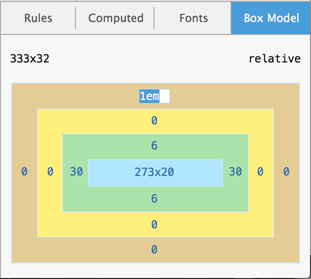
Editing the box model

Eyedropper

New to the color picker in the Inspector is an Eyedropper tool that grabs the color from any pixel on the page. Select the current color by clicking or pressing Enter. Abort the operation by pressing Esc. Use the Up/Down keys to move by one pixel, and Shift-Up/Shift-Down to move by 10 pixels.
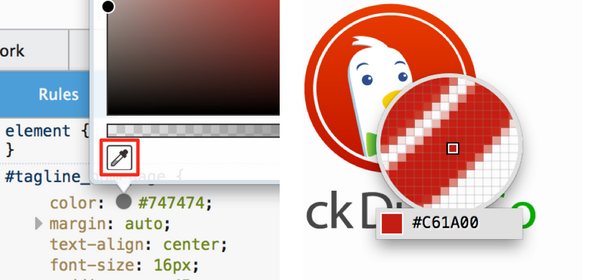
Eyedropper tool

You can also use the eyedropper directly to copy a color to the clipboard by accessing it from Web Developer menu, or the toolbar icon that’s enabled by going to the settings panel and checking Available Toolbox Buttons > Grab a color from the page. (development notes)

Console stack traces

console.error, console.exception, and console.assert logs in the console now include the full stack from where the call was made. (development notes)
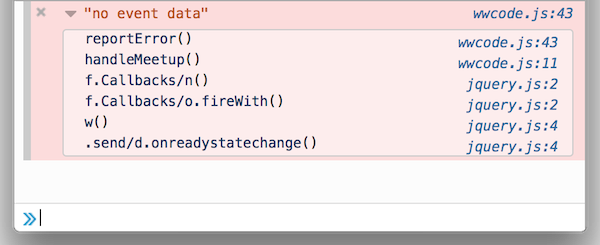
Stack trace in console.error() printout

Styled console logs

On parity with other browser developer tools, you can now add style to console logging with the %c directive.
(development notes)
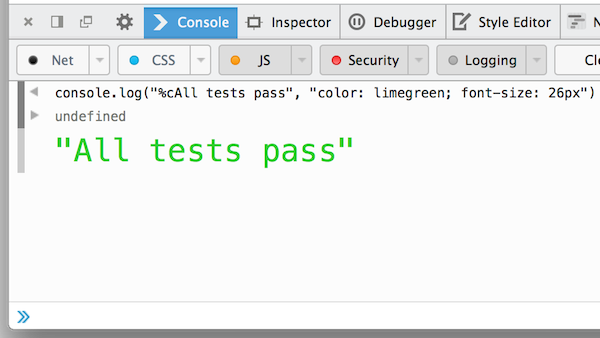
Using %c in console.log() to format output

Copy as cURL

Replay any network request in the Network Monitor from the comfort of your own terminal. Right-click a request and select the copy as cURL menu item to copy a cURL command to the clipboard, including arguments for headers and data. (development notes)
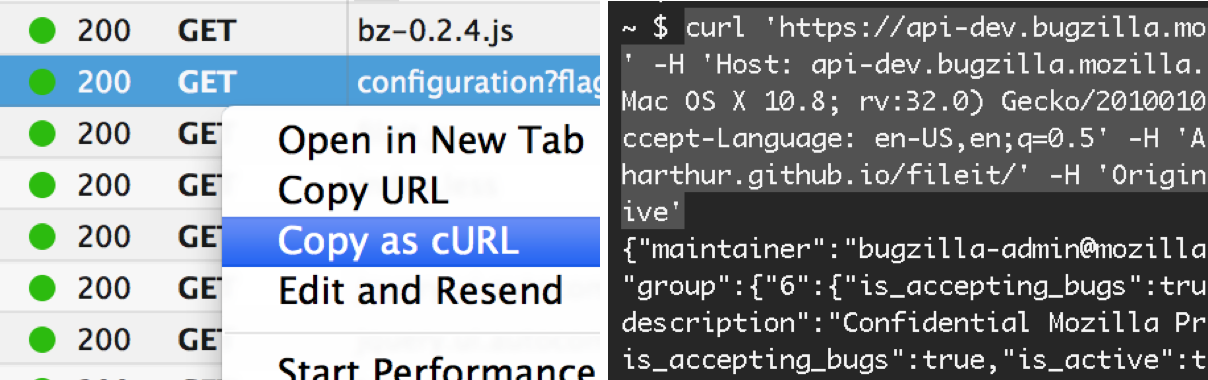
Copy as cURL in Network tool

Editor – multiple selection, Sublime Text keys

The source editor used in the developer tools has been upgraded to CodeMirror 4. With that brings:

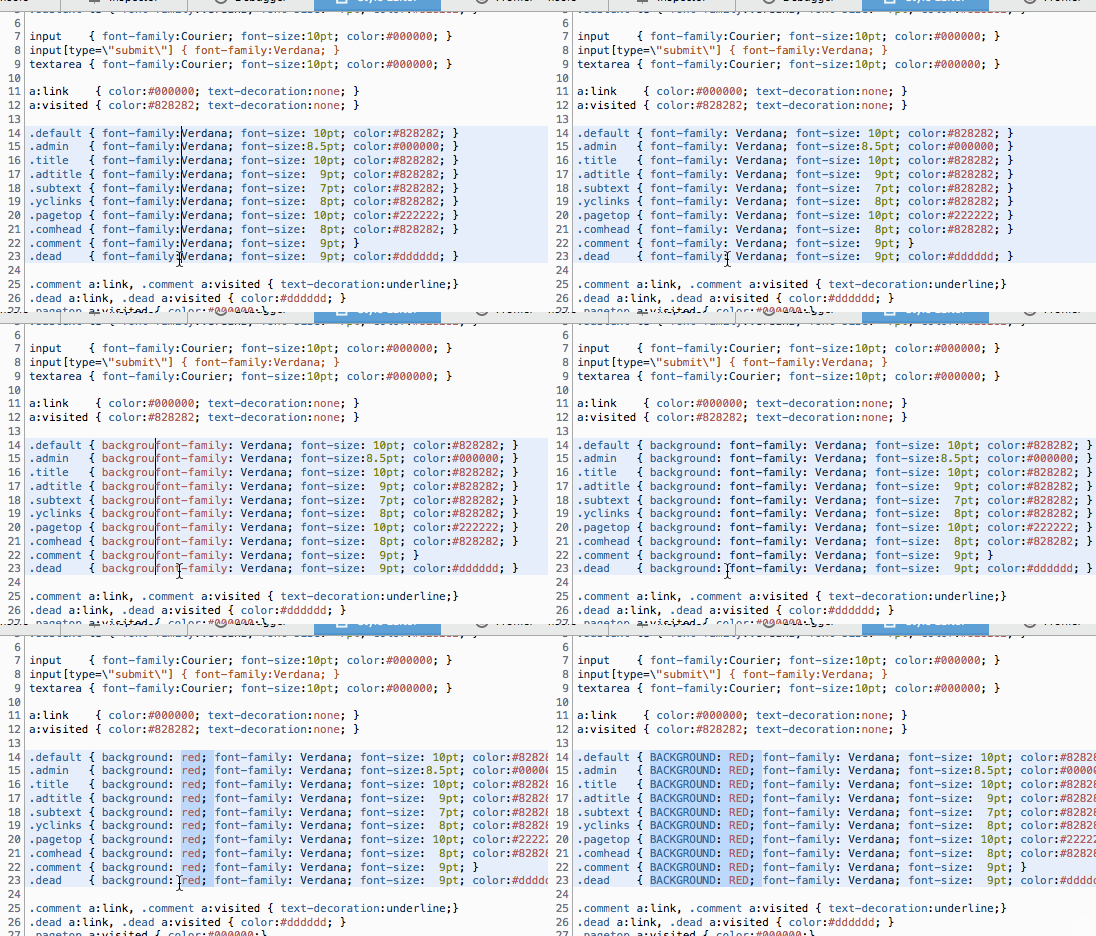
  • Multiple selection. Hold down Ctrl/Cmd while selecting to get multiple selections.
  • Rectangle selection. Hold down Alt to select a column-aligned block of text.
  • Undo selection. Undo the last selection action with Ctrl-U/Cmd-U and redo with Alt-U/Shift-Cmd-U.
  • Sublime Text keybindings. To enable, go to about:config in the url bar and set devtools.editor.keymap to sublime.
  • Multiple selection in action:

    animation of multiple selection in the editor

    development notes

    Canvas Debugger

    Debug animation frames in WebGL and 2d canvas contexts with the newly-landed canvas debugger. The canvas debugger is an experimental feature that has to be enabled in the setting panel. Multiple canvases are not yet supported (bug) as well as animations generated with setInterval (bug). The canvas debugger is described in more in this blog post.
    (development notes)

    Add-on Debugger

    If you develop Firefox add-ons using the Add-on SDK, there’s now a much easier way to debug your add-on’s JavaScript modules. See the blog post for more details. (development notes)

    Firefox 31: Add-on Debugger from Jordan Santell on Vimeo.

    Other features

    • Expand descendants. Hold Alt while double-clicking a node in the Inspector to expand all of its children and descendants. (development notes)
    • Persist network logs. Check Enable persistent logs in the settings panel to keep Network panel logs across reloads and navigations. (development notes)
    • JS warnings on by default. JavaScript warnings now show up in the Console by default. (development notes)
    • Scratchpad View menu. The Scratchpad tool now has a View menu with options for changing font size, hiding line numbers, wrapping text, and highlighting trailing spaces. (development notes)

    Special thanks to the 38 contributors that added all the features and fixes in this release.

    Questions or suggestions? Comment here or shoot feedback to @FirefoxDevTools on Twitter or our brand new feedback channel for Firefox Developer Tools. If you’d like to help out, check out the guide to getting involved.

    43 comments

    Comments are now closed.

    1. Stanislas wrote on May 7th, 2014 at 10:33:

      Copy as cURL (with all headers)? Don’t joke with me! Is this a dream? That is wonderful! / Finally, I can download anything 3:)

      1. panzi wrote on May 7th, 2014 at 12:24:

        Didn’t Chrome have this for years?

        1. Matt Hughes wrote on May 7th, 2014 at 14:58:

          That’s my reaction to most updates for the Firefox dev tools

        2. Paul Irish wrote on May 7th, 2014 at 17:29:

          Years? Nah. Chrome implemented it just a little bit ago (March 2013).
          Firefox DevTools are moving really fast; it’s so awesome.

          1. Robert Nyman [Editor] wrote on May 8th, 2014 at 01:18:

            Thanks Paul – much appreciated!

          2. Tim Peterson wrote on May 8th, 2014 at 04:10:

            the family that plays together stays together, go Goog and Moz!

        3. Artur wrote on May 7th, 2014 at 18:45:

          Yep.

    2. Vicky wrote on May 7th, 2014 at 10:40:

      I think it is still far behind Chrome Devtools in stable and canary. None of these features are new and would tempt me to migrate to Firefox professionally. I am not trolling but even though I like Firefox and idea of Mozilla’s Open Web these things always stop me from using Firefox full time. Please guys fix this and make it at par or even better than Chrome Devtools!

      1. Robert Nyman [Editor] wrote on May 7th, 2014 at 11:58:

        What are those things that stop you? Feel free to add your thoughts/ideas to our feedback channel for Developer Tools.

      2. Nick Fitzgerald wrote on May 7th, 2014 at 13:33:

        You might not be trolling, but you aren’t giving any constructive, actionable feedback. Specifics please!

      3. Luke wrote on May 7th, 2014 at 17:58:

        You’re right, Chrome has excellent debugging, especially compared to the glitchiness of current Firefox (Bugs 977972, 1003664, 923971, and others are especially annoying.)

        Unfortunately Chrome’s debugger is significantly slower than others, sometimes taking 10 seconds or more to even switch tabs. Also why did they set it so the status-bar obscures the devtools tabs? Firefox’s definitely has a better design.

    3. Skoua wrote on May 7th, 2014 at 10:47:

      So many nice things!

      1. Robert Nyman [Editor] wrote on May 8th, 2014 at 01:19:

        Thanks, glad you like it!

    4. Felix wrote on May 7th, 2014 at 11:52:

      Please give us the eyedropper as a native API. I beg you guys to wade through the security issues and give us the API. It’s crucial for creative web-apps!

      1. Robert Nyman [Editor] wrote on May 8th, 2014 at 01:20:

        Can you please add that as an idea at the feedback channel for Developer Tools?

      2. Brian Grinstead wrote on May 8th, 2014 at 05:40:

        We used the drawWindow API for this: https://developer.mozilla.org/en-US/docs/Web/API/CanvasRenderingContext2D#drawWindow%28%29. It is currently only available to browser code, but I agree that it would be very useful for design apps.

        There is a library (https://github.com/niklasvh/html2canvas) that emulates this behavior as best as possible, but as you can imagine this is very hard for user-code to get right and it will never be 100% accurate. Still, you could give it a try and see if it works for your case.

    5. Richard Magnano wrote on May 7th, 2014 at 13:09:

      I think the most important thing to note is the Quake 3 tab in that video.

      1. Kim wrote on May 8th, 2014 at 11:30:

        http://www.quakejs.com

        To play.

    6. ryan wrote on May 7th, 2014 at 15:30:

      I really want to switch from chrome but when I have errors in my underscore templates chrome gives accurate line numbers in console but firefox does not. I can give an example if needed.

      1. Heather Arthur wrote on May 7th, 2014 at 22:10:

        Please do give an example if you can. If you’re up for it, file a bug: https://bugzilla.mozilla.org/enter_bug.cgi?product=Firefox&component=Developer%20Tools

    7. Lewis Weaver wrote on May 7th, 2014 at 16:08:

      I like the direction you are taking this guys, sublime editing is a big winner in my book. keep it up!

      1. Robert Nyman [Editor] wrote on May 8th, 2014 at 01:20:

        Thanks, good to hear!

      2. Rafe wrote on May 12th, 2014 at 01:20:

        Sublime style editing is crucial. Much appreciated. Firefox is looking more and more enticing as a development alternative to Chrome.

        1. shadenfroh wrote on May 14th, 2014 at 00:37:

          Yes! This is a big one, very nice work guys!

    8. Mr. Mac wrote on May 7th, 2014 at 18:37:

      “Hold Alt while double-clicking a node in the Inspector to expand all of its children and descendants.”

      Sweeeet! Any progress on the other native Mac key/mouse idioms? :-)

      1. Robert Nyman [Editor] wrote on May 8th, 2014 at 01:22:

        Glad you like it! None that I know of, off the top of my head, but we’re working on constantly progressing with nifty things like this.

    9. Samuel Reed wrote on May 7th, 2014 at 22:58:

      This is a great update.

      Could you guys look into fixing something that’s been bothering me for months? I constantly hit cmd+R while the dev tools are open when I’m looking at a DOM element or something that I’ve changed in my text editor. I expect cmd+R to reload the page (preferably without cache, as it’s an intentional reload). In Chrome/Webkit this works great, in Firefox it never has. Just one of those little UI issues I’d love to see fixed.

      Thanks for all the great work so far.

      1. Robert Nyman [Editor] wrote on May 8th, 2014 at 01:07:

        Thanks! And we’re on it. :-)

    10. /dev/web wrote on May 8th, 2014 at 01:00:

      That’s all great, but still no improvements with user agent spoofing for mobile devices?

      1. Robert Nyman [Editor] wrote on May 8th, 2014 at 01:23:

        Glad you like it. Do you mean spoofing from the Developer Tools (as mentioned here) or a setting in mobile Firefox?

    11. Mark Learst wrote on May 8th, 2014 at 02:30:

      Firefox has really started to hit a solid stride in this area, I’m really proud of how far they’ve come since they’ve introduced their own version of DevTools. There is a lot of polish in FF 29 and will be doing more testing with FF.

      2 thumbs up to FF and Mozilla.

      1. Robert Nyman [Editor] wrote on May 8th, 2014 at 04:21:

        Thanks for the kind words, Mark!

    12. Asad wrote on May 8th, 2014 at 05:55:

      but whenever i’m trying to use this box i saw a error that shows : install java script / or update it. now what i do?

    13. Tim Gummer wrote on May 8th, 2014 at 23:03:

      Sounds great – particularly the sublimetext support

      – I stayed as long as I could with FF until sourcemaps and sass support in Chrome pulled me over. SO, unless i’ve missed something, it’s just sad taht Moz hasn’t implimented sourcemap / SASS support – tragic.

      Even as a chrome user, I find too many devs are fairly meanspirited to Moz – considering that FF has been the IE monopoly breaker that got webstandards happening across the board.

      At the very least dev tools in general need a bit of healthy competition, and it seems that Good and Mox get that.

      Keep it up.

      1. Robert Nyman [Editor] wrote on May 9th, 2014 at 02:41:

        Thanks for your comment. We do have that support, read more in Live Editing Sass and Less in the Firefox Developer Tools.

    14. Nic wrote on May 8th, 2014 at 23:21:

      Wouldn’t it make sense to be able to also change the box size size from within the Box Model Widget (as Chrome does)?

    15. Che xanh wrote on May 10th, 2014 at 11:19:

      I like the direction you are taking this guys, sublime editing is a big winner in my book. keep it up!

    16. Minh Kiên wrote on May 10th, 2014 at 11:22:

      the family that plays together stays together, go Goog and Moz!

    17. Stanimir wrote on May 14th, 2014 at 22:18:

      These sublime key bindings are AWESOME! Keep up the good work guys!

      1. Robert Nyman [Editor] wrote on May 15th, 2014 at 01:11:

        Thanks, glad you like them!

    18. Anton Kattsyn wrote on May 18th, 2014 at 12:29:

      Looks great! But i really want a “Console” functionality in Add-on debugger. For instance in Google Chrome it’s possible to setup a breakpoint and then execute some code in context of this breakpoint. I want the same in FF. That’s really helps in debugging and allow to easily change addon state manually in certain points of code for quick testing. So resulting that’s some kind of Scrachpad + Debugger.

      Btw, is it possible that this is already possible and i just miss something?

    19. Jeff wrote on May 29th, 2014 at 06:44:

      Love the progress on this!

      Any word on preventing the full page blue flash on page load (highlights body tag)? It gets crazy annoying when you keep the dev tools open all day.

      Thanks!

    20. Alex Marino wrote on June 1st, 2014 at 07:25:

      color picker – awesome!
      move one pixel at a time with arrow keys – drool!

    Comments are closed for this article.