Last week we featured a demo from Alistair MacDonald (@F1LT3R) where he showed how to animate SVG with Canvas and a bunch of free tools. This week he has another demo for us that shows how you can use the new audio element in Firefox 3.5 with some canvas and JS to build a nice-looking audio player.
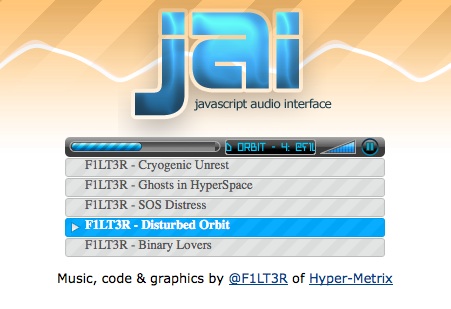
But what’s really interesting about this demo is not so much that it plays audio – lots of people have built audio players – but how it works. If you look at the source code for the page what you’ll find looks something like this:
<div id="jai"> <canvas id="jai-transport" width="320" height="20"></canvas> <ul class="playlist"> <li> <a href="@F1LT3R - Cryogenic Unrest.ogg"> F1LT3R - Cryogenic Unrest </a> <audio src="@F1LT3R - Cryogenic Unrest.ogg"/>. <li> <a href="@F1LT3R - Ghosts in HyperSpace.ogg"> F1LT3R - Ghosts in HyperSpace </a> <audio src="@F1LT3R - Ghosts in HyperSpace.ogg"/>. </ul> </div>
That’s right – the player above is just a simple HTML unordered list that happens to include audio elements and is styled with CSS. You’ll notice that if you right click on one of them that it has all the usual items – save as, bookmark this link, copy this link location, etc. You can even poke at it with Firebug.
The JavaScript driver that Al has written will look for a <div> element with the jai ID and then look for any audio elements that are inside it. It then will draw the playback interface in the canvas at the top of the list. The playback interface is built with simple JS canvas calls and an SVG-derived font.
Using this driver it’s super-easy to add an audio player to any web site by just defining a canvas and a list. Much like what we’ve seen on a lot of the web with the rise of useful libraries like jQuery, this library can add additional value to easily-defined markup. Another win for HTML5 and the library model.
Al has a much larger write-up on the same page as the demo. If you haven’t read through it you should now.
(Also? Al wrote the music himself. So awesome.)


The SVG fonts part is very surprising. I thought that Firefox doesn’t support SVG fonts yet, or is it all being done by the JavaScript?
This is……………………. rad.
I can see this JAI thing growing into something like the Flash-based XSPF player, which has mini- and micro-player versions.
http://musicplayer.sourceforge.net/
The visual of the player is fine, but for any reason all audio using the new Fx3.5 sound bad, with pitch, microstop and go many times.
If the browser is put in the backgroud the sound is earing fine.
Sorry for the pseudoenglish.
Each day, it is becoming more and more evident that the Open Web and the technology of tomorrow is expanding and blossoming into beautifully crafted future Internet. This audio, ‘JAI’ example just proves it.
Totally dig the tunes too!
Too damn cool!
404 on this though.
http://hyper-metrix.com/misc/jai/jai_javascript-audio-interface.zip
@Aaron – Yeah, I like the music as well.
@Ken Saunders – 404 fixed.
@Elijah Grey – Yes I am passing an that contains font glyphs using Javascript. It is the same engine I built for Processing.js, with a couple of minor modifications, so the fonts work cross-browser(except IE). http://processingjs.org. I use the Batik Java .ttf to .svg converter to generate my glyphs from a True Type font.
@Everyone – glad you are enjoying the music! Sorry for the low-quality audio, I figured people would rather hear something quickly and get an idea of how things work. The thing I like about HTML5 media most… is the simplicity… document.getElementsByTagName(“audio”)[0].play();
i have a question not about the player, but about the audio tag. how to play audio in mpeg codec? i know that firefox support only wave and ogg formats, but mp3 is more useful
But did it really need to use Canvas?
Couldn’t an almost identical interface be built with html elements, css gradients, background images, border-radius, and css fonts?
And then, if built without canvas wouldn’t it be better somehow for users of assistive technology?
When will Firefox support css gradients and multiple background images?
No audio dosn’t really ‘need’ to use the Canvas. And yes you can style up the browser’s audio player with CSS. But I wanted to use the canvas because I wanted to. I know that’s circular reasoning but all the best programs loop.
Anyway, images are evil rasterized pieces of junk. One day no-one will use images because they suck. Hahaha. But it’s true. Vive la algorithm.
another AUDIO demo: http://moztw.org/demo/audioplayer/
While I cannot vouch for the “uselessness” of images (for applications like, I dunno, photographs), it seems like canvas could be the right idea for this type of job. Presumably a canvas player could be modified (resized, re-colored, re-skinned) on the fly and even take up less bandwidth than images… though perhaps [?] more processing power to display.
Apologies for the post-beer, post-pm rambling re: uselessness of images. But I do think raters are over-used in web development. 4k of code can draw something way prettier than 4k of raster.
Regardless of all that… JAI was designed so it could expand or completely change color, style without having to use any images. I guess a lot of my programming style goes back to the days where using images was not really an option. My first computer had 16k of ram, which is less than most pictures on the internet, but you could still draw awesome graphics with it.
Synthesis.
Sadly it’s very slow on my computer, slower than Flash :-/