hacks.mozilla.org

3D transforms in Firefox 3.5 – the isocube

This demo was created by Zachary Johnson, a Minneapolis, MN based web developer who has also authored a jQuery plugin for animated “3D” rotation.

I’d like to show an example of a visual effect that can be accomplished using the new -moz-transform CSS transformation property that is available in the Firefox 3.5 browser. I was very excited to see this feature added to Firefox because I knew it would allow me to produce a faux-3D isometric effect, also sometimes called 2.5D. I created a demo where HTML content is mapped onto the faces of a “3D” isometric cube:
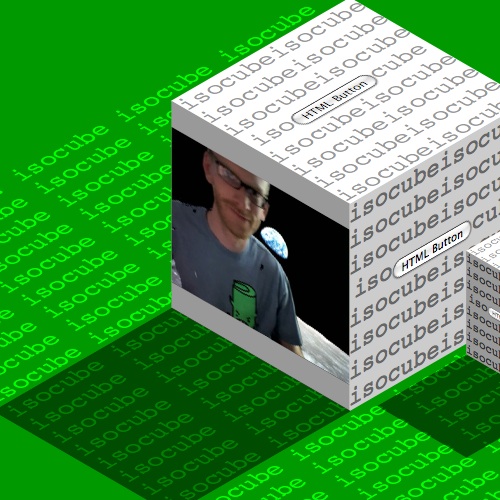
The -moz-transform property can take a list of CSS transform functions including rotate, scale, skew, and translate. Or, multiple transformations can be done simultaneously using a single 2D affine transformation matrix. Because all of the CSS transformation functions work in two dimensions, true 3D transformations with perspective projection cannot yet be accomplished. In this demo, I use the rotate and skew transformation functions in order to create the isometric effect.

First, I define a container div for the cube, and then a square div for the top, left, and right faces of the cube.

<div class="cube">
    <div class="face top">
    </div>
    <div class="face left">
    </div>
    <div class="face right">
    </div>
</div>
.cube {
    position: absolute;
}
 
.face {
    position: absolute;
    width: 200px;
    height: 200px;
}

Without getting too wrapped up in isometric projection math, we have to rotate and skew the cube faces in order to turn each square div into a parallelogram where the angles of the vertices are 60° or 120°. Here are what those transformations look like using the new -moz-transform CSS property:

.top {
    -moz-transform: rotate(-45deg) skew(15deg, 15deg);
}
 
.left {
    -moz-transform: rotate(15deg) skew(15deg, 15deg);
}
 
.right {
    -moz-transform: rotate(-15deg) skew(-15deg, -15deg);
}

Now all that is left to do is to use absolute positioning to connect each transformed div in order to form the faces of the isometric cube. You can use matrix math to do this, or you could just move the faces around until they line up and it looks right.

To add to the 3D effect, I’ve shaded the isometric cube by assigning different colors to the faces. I also gave the cube a shadow. You can see that the shadow is basically just a copy of the top face of the cube moved down to the bottom left, and then I gave the shadow div a black background color and set opacity: 0.5; in the CSS to make it filter over the page background.

Any HTML, such as the text and form buttons in this example, can be put inside the div for any face of the cube. It will be translated into the correct perspective. Christopher Blizzard gave me the idea to throw video onto one side of the cube using the new HTML5 video tag now supported in Firefox 3.5. As you can see, it works great.

Finally, by making a copy of the cube markup and using two more of the CSS transformation functions, I was able to create a second cube. I made the cube 50% as big using a scale(0.5) transformation, and I moved it into place by using translate(600px, 400px).

I hope you found this demo to be interesting and that it opened up your mind to some exciting possibilities that Firefox 3.5 CSS transformations bring to the web.

CSS transformations are also supported by Safari 3.1+ and Chrome using the -webkit-transform CSS property.

43 Responses to “3D transforms in Firefox 3.5 – the isocube”


  1. 1 Dan

    I haven’t seen the transforms used like that before, very cool. I like how all of the text is selectable.

  2. 2 Zacharias

    Why does the text jiggle as I select it?

  3. 3 Magne Andersson

    I can’t see the text under the shadow of the big box, is the image in the article from an old version, or does it render differently on a Mac (which the button suggests it is)?

  4. 4 Michael Kozakewich

    Would jQuery be able to handle animations of that? I’ll have to check. If you could do some crazy stuff to spin out a cube to display an external website in an iframe, it would be fantabulous.

    You could have buttons on the side to control navigation.

  5. 5 Pino

    Lol, this example crashes my browser. Mozilla/5.0 (Windows; U; Windows NT 6.0; nl; rv:1.9.1) Gecko/20090612 Firefox/3.5. A very bad example of Firefox’s greatness :P

  6. 6 Magne Andersson
  7. 7 Rowno

    Lol, the demo crashes my Firefox too when I try to select text on the box.

    Mozilla/5.0 (Windows; U; Windows NT 5.1; en-US; rv:1.9.1b99) Gecko/20090605 Firefox/3.5b99 (.NET CLR 3.5.30729) on Windows XP

  8. 8 kbrosnan

    Would either of the people who had crashes type about:crashes in the address bar and check for a crash ID. Either post back to this blog or email me commenter name at gmail dot com

    http://support.mozilla.com/en-US/kb/Mozilla+Crash+Reporter#Viewing_crash_reports

  9. 9 g zgodero

    Nothing happens at all, no action, no crash… nada.

  10. 10 Quezako

    I had a crash 1st time I clicked on th video with Fx 3.5b99 but I must admit this demo is amazing!

  11. 11 tomh

    Quite cool, certainly shows some over the top uses for the properties. I must say that I couldn’t help think of tags when seeing this… Lets hope people who are capable of using this tag know how to do so sensibly ;-)

  12. 12 Alfred Kayser

    Great! Not just the video is transformed, but also the controlbar (when it is enabled)!

  13. 13 web designer

    Thank you
    will try it
    I am just wondering how it will look like on ie7
    regards

  14. 14 Rowno

    The crash ID’s for both of my crashes on the isocube are 453109a7-8409-4c7a-aeda-176e72090615 and f50c518f-b86d-4e34-a890-491d92090615.

  15. 15 Quezako

    66c35595-a93a-4934-bb20-4038a2090616

  16. 16 philoye

    FYI, this demo works just find in Mac/Safari 4, well, at least, in a recent Webkit nightly build.

  17. 17 Magne Andersson

    @Web designer: It won’t work in IE7, nor IE8. As we all know by now, Microsoft is slow and keeps new standards away from becoming popular.

  18. 18 Denis Seleznev
  19. 19 Alexandre

    Crash everytime after a few seconds, with FF3.5 RC2 on Windows Vista 64-bit.

  20. 20 Alexandre

    kbrosnan: Sorry, no crash ID. It looks like Firefox dies before generating the report. It try to contact you by mail with more information.

  21. 21 Alexandre
  22. 22 Quezako

    @Alexandre did you try to deactivate all your add-onds?
    I have no problem with Firefox 3.5 RC2 + Windows 7 x64.

  23. 23 DarthNihilus

    Does not work correctly with FF 3.5 RC 3. Somehow they overlab eachothers font, i don’t know…

  24. 24 SelenIT

    Looks great! Thanks, Zachary and Christopher!

    But I’d like to suggest a little “improvement”: to replace the meaningless empty divs for the shadows of the cubes with other CSS3 (something like -moz-box-shadow: -398px 200px 3px rgba(0, 0, 0, 0.5); and the same with -webkit- for the top sides, this worked for me in Firefox 3.5, Safari 4/Win and Chrome 2).

  25. 25 aroth

    Add javascript to make the cube rotate in 3D, please.

  26. 26 Andre

    Are there w3c approved equivalents of these properties

  1. 1 Transformaciones 3D en Firefox 3.5 - Gregorio Espadas
  2. 2 Firefox 3.5 y las transformaciones 3D | aNieto2K
  3. 3 Firefox 3.5 y las transformaciones 3D : Blogografia
  4. 4 Max Design - standards based web design, development and training » Some links for light reading (16/6/09)
  5. 5 颠覆网络35天 ─ Firefox 3.5中的3D变形:isocube < MJiA
  6. 6 Mozilla Firefox 3.5 RC1b4 « Christoph Voigt
  7. 7 the tristan washing machine at hacks.mozilla.org
  8. 8 Bryan Clark » Blog Archive » Cubed Mail
  9. 9 Bryan Clark: Cubed Mail | Full-Linux.com
  10. 10 First look to Firefox 3.5 RC2 - Mozilla Links
  11. 11 Monthly Interesting Links Roundup (June 2009) - 2
  12. 12 Firefox 3.5 Released, Detailed Feature Review. | Taranfx: Technology Blog
  13. 13 » Blog Archive » First look: Firefox 3.5 released, ready to “upgrade” the Web
  14. 14 Upgrade to Firefox 3.5 on Ubuntu 9.04 – Jaunty Jackalope | gaarai.com
  15. 15 Everything Tech » Blog Archive » First look: Firefox 3.5 released, ready to “upgrade” the Web
  16. 16 WebKit支持OS X 3D CSS变换 « 每日IT新闻,最新IT资讯,聚合多站点消息,保证你与世界同步
  17. 17 谋智社区 » Blog Archives » 颠覆网络35天 ─ Firefox 3.5中的3D变形:isocube

Leave a Reply