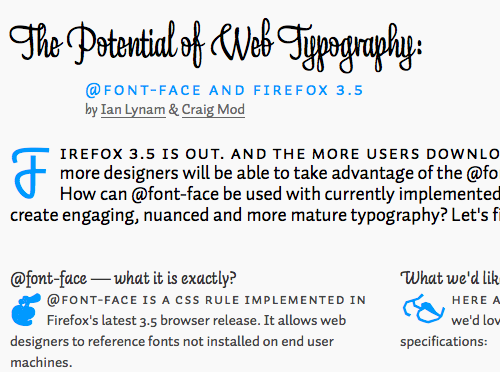
This post counts as both a demo and commentary about the changing nature of typography on the web. Ian Lynam and Craig Mod have put together a page that is an excellent example of typography in action, but also offer some suggestions on what the next steps for typography on the web might look like. The page itself takes advantage of a number of typefaces that Craig and Ian got permission to use and uses a pleasing multi-column layout. Please click through to the complete article to get the full effect.
@mozhacks on twitter
- The File API spec by Mozilla's own @arun is an easy read. Most of it will be in Firefox 3.6: http://bit.ly/3CGKPp 2 days ago
- web developer survey - now closed with 5000+ responses from 119 countries - http://bit.ly/1suI0j - thanks to everyone who helped! 2 days ago
- @RebeccaRipple There are a lot of free fonts out there, too. Check out fontsquirrel and several other sites that have them. in reply to RebeccaRipple 2 days ago
- @trygve_lie Yeah, but with a different goal - no signing required here and this is about perf not permissions. in reply to trygve_lie 2 days ago
- FontFont fonts available on the web starting today - http://bit.ly/4zfCni 2 days ago
- More updates...
Links
Translations
Recent Posts
- web developer survey: 5,000+ responses from 119 countries!
- what’s new in Firebug 1.5?
- a proposal: resource packages to improve performance
- web developer survey update – help wanted!
- 5 years of Firefox
- two important api changes – CSS gradients and the media load event
- Firefox 3.6 Beta 1 now available – what’s new for web developers
- help build the mozilla developer network
- font_dragr: a drag and drop preview tool for fonts
- after Firefox 3.6 – new font control features for designers
Categories
- 35 Days (45)
- @font-face (7)
- Audio (4)
- Canvas (11)
- CSS (28)
- Debugging (1)
- Demo (35)
- Device APIs (1)
- DOM (9)
- Drag and Drop (1)
- Feature (28)
- Firebug (1)
- Firefox (8)
- Firefox 3.5 (45)
- Firefox 3.6 (6)
- Geolocation (3)
- Images (2)
- JavaScript (24)
- MDN (3)
- Multi-touch (2)
- Performance (1)
- Security (1)
- Standards (18)
- Survey (1)
- SVG (7)
- TraceMonkey (4)
- Uncategorized (3)
- Video (14)
- WebGL (3)
- XMLHttpRequest (3)


Awesome!
As a non-native English speaker, it is harder for us to read connected Latin characters. Do not use script letters unless it’s readable enough or there is a user pref to disable the font.
The website seems to have gone down pretty fast. I don’t suppose anyone has a mirror, or a larger screenshot?
seems OK now, never mind
Pity it looks so bad with cleartype turned off.
You mentioned a couple times that @font-face is only available when using FF 3.5 but thats not exactly correct. Safari 4, ie6 & ie7 and the latest version of Opera also use @font-face.
Sadly, Trunk running on Windows7 refuses to display the “Liza” font, resulting in a very strange layout for the headlines…
Another problem is that Firefox for Windows accepts ttf files, which are used exclusively in the demo… however they are not supported on other platforms. I really think support for ttf files on Windows should be disabled ASAP as authors (as we can see here) are very likely to use ttf files when they appear to work, without knowing about these problems.
And finally: Tomer has a point. You can turn linked fonts off via about:config, gfx.downloadable_fonts.enabled false, but we should really consider adding a GUI for it at Options/Content/Fonts.
@Adam: It seems like Safari and Opera both have issues interpreting @font-face references when used with pseudo selectors such as first-line.
While some of the referenced fonts render as expected in Safari and Opera, only Firefox 3.5 generates the full intended results.
Maybe we’ve screwed something up in the CSS that’s throwing Safari/Opera off. If you have any suggestions, please let us know!
Best,
Craig
TTF/OTF files are supported by Windows, OS X and Linux (fontconfig/freetype/pango), TrueType is the standard font format (Created by Apple, extended by Adobe and MS as OpenType)
Even platforms like OS/2 and Windows CE support TTF/OTF files.
Terribly Sorry, seems like I mixed something up:
For some reason I thought I remembered TTF files not working on Linux.
Unfortunately, the demo page falls into the trap of using fonts with funny characters that are placed in the same code location as normal letters. So to get those fancy leaves/fruits for the major bullet points, the authors typed ‘A’, ‘B’, etc and then styled it to look like section markers. Any browser that fails to download the needed font (not just those that don’t support @font-face) will then draw the now random looking letter into the middle of the text. Very poor design.
This is a really great demo of the @font-face rule’s capabilities. One thing I’m slightly concerned though, is how they use regular letters (”A”, “B”) styled with a custom font (”FaukinGlyph”) to present glyphs. As far as I understand it, this could potentially cause accessibility problems when the font file or font definition are not available (network issue, css turned off). The reader will see random letters at the beginning of each paragraph.
It also means that you could create a font with a different than standard mapping between characters and glyphs. The HTML says one thing, and the user sees an entirely different thing in this case. Great way of protecting e-mail addresses, possibly, but also a way of walking around Bayesian spam or spoofing-attempts filters.
@Hanspeter:
Good point.
Because of EULA licensing issues, we had to create custom glyph-limited editions (in collaboration and with the approval of Underware, of course) of some of the fonts, including the special glyph font. For convenient reference we placed the glyphs in A B C D E F knowing this was a highly specific demo for Firefox 3.5. Of course, we recommend methods that degrade more gracefully for production sites expected to be accessed by an unpredictable variety of browsers.
Hello all,
There is a malformed URI reference in the demo at line 49:
a href=”http://github.com/blog/363-cufón-a-sifr-alternative” Cufon /a
The o with acute accent should be escaped: %F3 is the correct way to do this.
HTML 4.01, section B.2.1 Non-ASCII characters in URI attribute values
http://www.w3.org/TR/html4/appendix/notes.html#non-ascii-chars
regards, Gérard
There’s an issue that i’d like to have a better understanding. How can @fontface help web designers to build a web with more typographic richness, without exposing commercial font files for everybody’s download (piracy)?
There is the issue about file size. CJK fonts tend to be huge. Microsoft’s WEFT could scan a page and create a new font file (although in their own “font object” format) stripping all unnecessary glyphs for that particular page.
I think that was a neat idea.
I’m not terribly web-savvy, but as a designer this is very exciting.
Also, I updated to 3.5 to view the @font-face article correctly, and noticed that when I hit cmd+D to bookmark it, all of the text took on a shadow. It didn’t go away until I hit cmd+D again. I’ve never seen this happen before. It actually looks pretty cool, but what’s the story here?
Lauren: pressing D, B and G on the website will toggle a few fancy features. Thus, when pressing Cmd-D, you’re toggling the text shadow.
Which leads me to an important rule they ignored: when performing keyboard handling, always check for modifier keys. Drop shadow shouldn’t toggle when the user wants to favorite your website, your numbers-only field shouldn’t block the user from pressing Ctrl-A, and so on.
Also: if you plan to use custom fonts, please use font-size-adjust. Watching the text jumping around when the new fonts load is very, very annoying.
I can’t seem to find ANY difference between the way Firefox and Safari render fonts in the demo. I uploaded a file to my server so you can see it for yourself: http://www.hclientes.com/font-face.png
(Safari 4 on the left, Firefox 3.5 on the right)
If you see any difference, please post.
Greetings.
@Chaac:
Thanks for posting this screenshot. It’s subtle, but there is at least one difference: Safari’s interpretation of the margins / line-height of the drop-cap-glyphs. If you press ‘b’ on the page to turn on the baseline grid, the difference between the Firefox and Safari versions becomes much clearer.
Best,
C
@Craig Mod:
I have seen the baseline grid on both and I see the very small difference you mention. That’s it? It think the difference is too subtle to state only one browser renders “as intended”. I think both browsers do show “The potential of web typography” quite nicely.
Greetings.
If you want to create custom glyphs for presentation, put them into the unicode private use block range so they dont clash with anything else on the planet…
[I don't work in this area, so please accept my apologies for taking up everyone's time if my wonderful "new" idea turns out to be as old as the hills.]
WRT licensing, the problem here is different to the one DRM usually tries to solve. Normally, DRM locks out the end-user from experiencing content they have sought and acquired, but haven’t gained the rights to experience. In this case, however, it is a class of content providers (web sites) that need to be controlled, with end-users invariably becoming unwitting cohorts. Perhaps a different solution is possible in this circumstance…
Designers could digitally sign and license font files on a per-web-site basis. Most web browsers would refuse to load incorrectly licensed font-files, and report the “fingerprint” of unlicensed font-files to a monitoring agency (mostly just a database that maps each licensed fingerprint to an owner/email). Of course, reporting would be at the users discretion, so designers working on and testing fonts could opt out, and maybe even store the fingerprint as “trusted”. Web sites, however, would lack the ability to control reporting, and would thus expose themselves to copyright infringement charges. The fingerprint could also serve to prevent a designer from defrauding another designer by acquiring digital signing rights for someone else’s font.
The only real sticking point is developing a robust fingerprinting method that survives font-tweaking by infringers. Some method that allows partial fingerprint matching and forces the infringer to materially alter the appearance of the font would be ideal. Normal digital “fingerprints” such as SHA-1 wouldn’t do.
Correction: the other major sticking point is that end-users can still pilfer legitimately-licensed fonts from a web site and use them in offline materials that aren’t subject to browser-reporting. This leaves us back in the tarpit of conventional DRM.
It won’t catch on as well (virally) if we can’t use it inline. Does it work inline too, like with a “span” tag?
For example, let’s say someone wants “kool” symbols of cats, dogs, whatever. People will use this if I can say, “Here, cut and paste this one line of code.”
But if trying new fonts requires connecting “style” references in disparate sections of code, this confuses people, and you won’t see as much adoption, creative implementation by non-specialists.
Ugh, putting us all at the whim of tasteless “designers” the world over. I will continue to browse with “Allow pages to choose their own fonts” OFF, thanks.
I found this article exciting. I went on to experiment (and succeed) with cross-browser font embedding and created a tutorial for anyone interested in embedding fancy fonts in their web pages.
Bottom line: With FFx’s support of @font-face, it’s now possible for cross-browser font embedding with FFx, Safari, IE6, IE7 and IE8 (and purportedly Opera v10 & Google Chrome following soon).
My observation: Of all the user agents that render embedded fonts, FireFox is the only one that shows a perceptible delay, when loading a page containing embedded fonts (i.e., page initially renders with – assume “the default” fonts – then re-renders and “flashes”, loading the embedded fonts).
This text-replacement re-rendering is most annoying and I’m wondering if there is way for FireFox to remedy this, as other user agents seem to have accomplished?
(Behavior noted in FireFox for both on my “x-Browser Fonts” article and the “Potential of Web Typography” article).
Cheers,
-stk
Thank you for sharing this demo. I noticed your demo page works just fine on a Mac with FF 3.5.2, but does not work at all in Windows with FF 3.5.2. Both browsers allow pages to choose their own fonts. Any thoughts?
Kind regards,
Matthew
As exciting as this is, I can’t help but have some fears about @font-face leading to a lot of ugly typography on the internet.
Hopefully it will make the internet a more beautiful place, and not like a bunch of designers got drunk on the punch and barfed fonts everywhere.
My full blog post: http://blog.twg.ca/2009/09/4-fears-of-font-face/
@Matthew … this page works fine in my winFireFox3.5.2 … dunno what the problem might be