Note: The author of the demo, Stéphane Roucheray, is a member of the PIMS team. The demo was first posted on the Pims World Labs weblog.
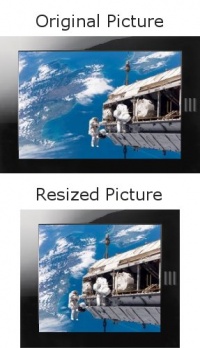
Content Aware Image Resizing is a way to re-target an image size without modifying its content ratio, in other words : non-linear image resizing. The algorithm was first explained by Shai Avidan and Ariel Shamir and published in 2007 (“Seam Carving for Content-Aware Image Resizing.”)
Since then several excellent Open Source implementations have been released. For example, there is a plugin for The Gimp and CAIR a standalone application in C++.
But thanks to Canvas and JavaScript it’s now possible to do this in the browser without a plugin.
Since version 1.5, Firefox offers bitmap manipulation through the Canvas API. Version 3.5 introduced not only the fastest Firefox JavaScript engine ever, but also a new Canvas method – createImageData – providing a much more powerful environment.
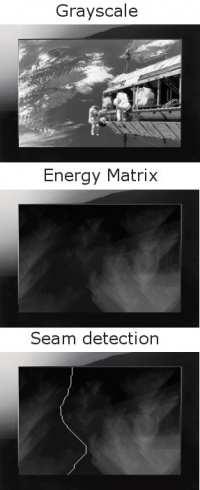
For this demo, a sub part of the Content Aware Image Resizing algorithm has been implemented. The width of the image can be reduced interactively without modifying its height. This implementation uses seam carving to re-size the image, subtracting the less visible vertical lines. It is a four step iterative algorithm. One iteration is one pixel width re-size. First an image is loaded into the Canvas context and then the iteration starts :
- A grayscale version of the image has to be calculated
- The edges of the image (Sobel convolution is used in our case) and its energy matrix is computed
- The seam of least energy (1 pixel vertical line from the bottom to the top of the energy matrix) is detected
- Then the pixel of the detected seam is removed from the original image and the result is re-injected as a source image to step 1
Each of the previous steps stores a whole matrix of data at the source image size. While these matrices are not all images but actually artifacts of the algorithm, storing them in an ImageData object is more convenient than using simple Arrays. This is why the createImageData method of the Canvas context is used. One of the benefits of this process is to allow showing the intermediate computations made under the hood.
This demo shows that’s possible to do more intelligent image resizing than just flattening an image’s pixels with CSS. Having computational and image manipulation capabilities directly in the browser opens up a new range of possibilities of how image data can be displayed to users. This is only one small demonstration of that.


Quite impressive. But is it really that slow or did you just make the demo slower to visualize the algorithm?
@Markus The first pass is slow. But after that, it’s really smooth (try to resize the image via the handle).
@markus : I’ve noticed different rendering speeds on different platforms. However, the algorithm makes a lot of computation and furthermore is iterative. It means the image “width – 2px” cannot be computed before the image “width – 1px” has been computed. That’s some of the reason it seems slow.
To improve performance it is worse trying to uncheck “Refresh images during process”. Displaying intermediates images results in lost of time for computing. The algorithm tries to compute as fast as it can and stores the intermediate results. So you can play with it while process.
Probably something another demo could use to show off web workers
Not sure how much web workers would help there, except for not blocking JS execution while they are running. For multiple workers to lead to a big speedup, I would expect the algorithm to be required to be parallelizable.
Is there a reason to use keydown, not keypress, for the arrow key thing? The latter should work better cross-browser for holding the key down…
I don’t get it. How is driving my hard-drive into a fit for 10 minutes to produce strange distortions in parts of the image an improvement in the web? The initial codebase of searching the image for “inactive” regions should just be used to CROP the image. Most images fall into one of three catagories… left or right heavy, center heavy, top or bottom heavy. It seems like it would be rediculously faster to scan an image, figure out which it is, and simply crop to effect. Maybe their could even be a tag included in the image description to specify which to use, which would not only cut down on all this crazy computation, but allow the designer to make sure the wrong thing doesn’t get cropped accidentally.
I’m not saying this to just be cross, as a member of the photographic community you would be surprised how upset photographers will be when they find out their web-browser is destroying the integrity of their images. Typical image resizing by squishing may be crude and even ugly… but it is at least honest… and someone can always “resquish” an image to see how it basically originally looked. This “feature” goes so far down the path of corrupting the integrity of the original image, it’s just about criminal. Not to say that the programmers haven’t done an excellent job, it’s a really sophisticated piece of programming… but there’s a moral issue to consider here. Just because you CAN do advanced level Photoshop editing right in the browser doesn’t mean you should.
Consider the multiple cases last year alone of journalists caught in the midst of scandals for Photoshopping images. And especially for artists and professional art photographers… the “dead space” being stolen out of these images isn’t just dead space. It’s called negative space and it’s often as and sometimes MORE crucial than the apparent subject in conveying the meaning of the image. The groups of people sitting on the steps is a great example… in the initial photo, there is plenty of space between the people and the photo is friendly and inviting. After being “resized” it’s a cramped claustrophobic atmosphere. The supposedly same image now has a completely different feeling. Cropping can be just as dangerous to image integrity, but at least it’s considered a normal publishing practice.
Pjdkrunkt: Firefox doesn’t do this transformation automatically. It’s just an example of what you can program in JavaScript thanks to the improved JS speed and canvas.
Having a CSS property to define method to use when resizing image could be useful :
.img {
resize-policy: liquid;
resize-policy: linear;
resize-policy: crop;
}
TOO BAD
There’s a new STATE-OF-THE-ART algoritm now!
( http://www.vimeo.com/5024379 )
Urgh, no, liquid resize (which is what this is) is terrible for day-to-day resizing. It has value from a content production point of view, but it introduces so many artifacts and weirdnesses to images that Id never want my browser to do it automatically to any image I view.
@Alex: image-rendering is the CSS property you’re looking for. I believe the IE equivalent is -ms-interpolation-mode.